
Valorant Cheat Menu for Windows
Tune aim FOV, smoothness and target selection. Add player, ability and spike data to the overlay, then save your settings. Full functionality on supported builds requires Cloud DMA.
Product Overview
At a glance
Key capabilities
The short list for Valorant Cheats, before the full module list.
Another 20 options are in the full list below.
Overview
Aim and visibility controls for VALORANT
Review the features, prerequisites and limitations.
Set the aiming area, how assistance moves and which body region it targets. Player Visual Options controls position, identity, equipment and health indicators, including what appears through cover.
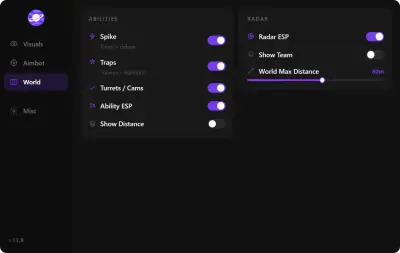
World Visual Options covers supported abilities and traps, plus spike time and defuse progress. Use the separate range controls and Combat Mode to keep the overlay readable.
Aim response
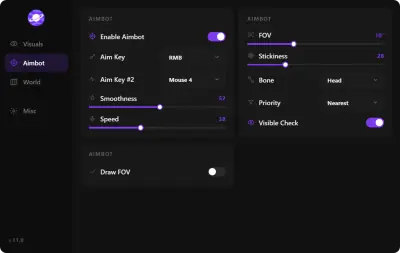
The Aimbot Options menu separates the area searched for targets from the way assistance moves. FOV sets the area. Smoothness adjusts how gradually aim moves and Speed controls the movement rate. Stickiness affects how long the module stays associated with a selected target.
The menu also lists a filter, a target bone selector and a visibility check. Draw FOV and Draw Target Line show the targeting area and the selected target visually.
Player ESP and wallhack visuals
Use boxes, skeletons, head circles or snaplines to mark players. Agent names and equipment labels help identify who is on an angle and what they are carrying. Health and shield bars are separate fields, alongside rank, level, distance and view direction.
A maximum distance limits how far player indicators appear. Colors and visibility controls let you decide how much information to display.
World ESP, traps and spike information
World Visual Options has separate Ability and Trap settings, with options for icons, distance and supported agent-specific utility. World ESP has its own range limit. Coverage can vary by agent and object.
Time and Defuse Progress are listed under Spike. Combat Mode hides Ability and Trap ESP with a hotkey when utility markers crowd the view.
Configurations and capture
Use Create Config, Save Config, Load Config and Unload Config in Misc Options. The menu also has an adjustable font size. The overlay is advertised as stream-proof. Compatibility with individual recording or streaming applications is unverified.
Checkout and delivery
Open View Purchase Options to see the current purchase terms on the checkout site. Follow the setup and delivery instructions provided with the order.
Windows and Cloud DMA
Valorant Cheats is documented for Windows PC. Full functionality on supported builds requires Cloud DMA, a separate product with its own Windows, Hyper-V and service requirements. The Windows setup guide explains what to check. Confirm the supported Windows release, game build and any additional prerequisites with support before ordering.
Modules
What's included
The full option list for Valorant Cheats. Each line can be switched in the menu.
- Aimbot toggle
- Aim FOV and FOV display
- Smoothness and speed
- Target stickiness
- Target filter
- Bone selection
- Visibility check
- Target line
- Boxes and skeletons
- Head circles and snaplines
- View direction
- Health and shield bars
- Agent identity
- Rank and account level
- Equipped item
- Player range limit
- Ability ESP
- Trap ESP
- World icons and distance
- Agent-specific ability and trap options
- Spike Time
- Defuse Progress
- Combat Mode hotkey
- Overlay colors
- Configuration management
- Menu font size
Experience
Menu layers · After checkout
Review the menu options and check what you need for delivery and setup.
In-game layers
- Layer A
Overlay illustration
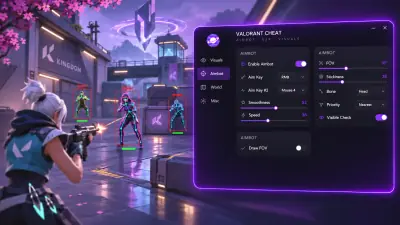
A stylized VALORANT scene pairs player markers with an illustrated menu.
- Layer B
Aimbot panel preview
The panel preview shows aiming sliders and a visibility check.
- Layer C
World panel preview
The panel preview groups spike information, traps and abilities with distance controls.
More products
Pairs well with
Utilities sold beside the cheat. Each one keeps a separate page.
- HWID Spoofer Covers disk serials, MAC addresses, GPU identifiers and related hardware fields. Includes a trace cleaner. View details: HWID Spoofer
- Cloud DMA GREENWARD, Static Server and AWS are required separately. Review the Hyper-V and Windows requirements before checkout. View details: Cloud DMA
- Skin Changer Choose looks from a local library. Confirm game coverage before purchase. View details: Skin Changer
FAQ
Questions about this page
Answers for this page. The FAQ page holds the rest.
Blog
Related guides
Find practical explanations of menu controls, prerequisites and account risks.
Confirm which build is supported, what Cloud DMA requires and who handles delivery before you pay.
The aiming menu separates target eligibility from movement and on-screen feedback.
Riot’s PC requirements and the product’s Cloud DMA prerequisites are separate checks.
Player ESP can display position and status using several independent markers.
World Visual Options covers supported utility and gives it its own display controls.
Two documented fields cover timing and defusing in supported spike states.
VALORANT forum
Read discussion
Read-only archive of fictional editorial discussions about the VALORANT menu, overlays, and setup. Handles and experiences are illustrative. Compatibility claims in the examples are unverified.
- Aimbot Options Speed, smoothness and stickiness — how do these three actually interact? Genuine question because the menu gives me three sliders that all sound like they do the same job. Smoothness, speed, stickiness. If I turn smoothness down, is that the same as…
- Gameplay In a 2v2 retake, which ESP elements are actually decision-relevant? Retakes are the most information-dense situation in the game and the easiest to over-clutter. You've got the spike ticking, two defenders somewhere in the site, utility on the…
- Misc Options What does Unload Config actually do? Create, save, load, unload. Three of those are obvious. Unload is the one that's never explained.